
uCalc Fast Math Parser &
Token-Aware Text Transformer
Welcome to the uCalc SDK, a comprehensive parsing and transformation SDK designed for modern, cross-platform development. Whether you need a lightning-fast math parser or a token-aware text engine, this C++ and .NET parsing SDK gives you the robust tools required to evaluate complex expressions, build domain-specific languages, and safely refactor structural data with ease.
- Windows (32-bit, 64-bit, arm64 Copilot+PC)
- macOS (Intel x64, arm64 M-series)
- Linux (x64, arm64)
Fast Math Parser
A high-performance, cross-platform engine to easily parse and evaluate complex mathematical expressions rapidly.
Text Transformer
Go beyond regex. Transform code and text using advanced yet intuitive, token-aware structural parsing and syntax manipulation.
Advanced String Library
A comprehensive string manipulation library for smart text processing operations.
A quick start example showing defining a variable, a function, and evaluating an expression.
ID: 1296
					using uCalcSoftware;

var uc = new uCalc();
uc.DefineVariable("x = 10");
uc.DefineFunction("DoubleThis(n) = n * 2");

Console.WriteLine(uc.Eval("DoubleThis(x) + 5"));
25using uCalcSoftware; var uc = new uCalc(); uc.DefineVariable("x = 10"); uc.DefineFunction("DoubleThis(n) = n * 2"); Console.WriteLine(uc.Eval("DoubleThis(x) + 5"));
					#include <iostream>
#include "uCalc.h"

using namespace std;
using namespace uCalcSoftware;

int main() {
   uCalc uc;
   uc.DefineVariable("x = 10");
   uc.DefineFunction("DoubleThis(n) = n * 2");

   cout << uc.Eval("DoubleThis(x) + 5") << endl;
}
25#include <iostream> #include "uCalc.h" using namespace std; using namespace uCalcSoftware; int main() { uCalc uc; uc.DefineVariable("x = 10"); uc.DefineFunction("DoubleThis(n) = n * 2"); cout << uc.Eval("DoubleThis(x) + 5") << endl; }
					Imports System
Imports uCalcSoftware
Public Module Program
   Public Sub Main()
      Dim uc As New uCalc()
      uc.DefineVariable("x = 10")
      uc.DefineFunction("DoubleThis(n) = n * 2")

      Console.WriteLine(uc.Eval("DoubleThis(x) + 5"))
   End Sub
End Module
25Imports System Imports uCalcSoftware Public Module Program Public Sub Main() Dim uc As New uCalc() uc.DefineVariable("x = 10") uc.DefineFunction("DoubleThis(n) = n * 2") Console.WriteLine(uc.Eval("DoubleThis(x) + 5")) End Sub End ModuleEvaluate pre-parsed expressions rapidly
Achieve rapid execution speeds. uCalc separates the heavy lifting of parsing from the execution with its "Parse-Once, Evaluate-Many" architecture, making it blazing fast inside tight loops.
⚡ Benchmarking Tip: Clicking "Run" in this online example includes the overhead of network routing and remote compilation. To see the actual evaluation speed (which is near-instantaneous regardless of loop size), uncomment the StopWatch line to print the exact execution time of the loop itself, excluding online overhead.
Note: If you think the preview version is fast, wait until the optimized production release comes out.
Using the parse-evaluate pattern for high-performance calculations in a loop with a changing variable w/ stopwatch.
ID: 1460
					using uCalcSoftware;

var uc = new uCalc();
var variableX = uc.DefineVariable("x");
var userExpression = "x * 2 + 5";
var Total = 0.0;
var UpperBound = 1000000; // One million

// Parse the expression just once before the loop begins.
var parsedExpr = uc.Parse(userExpression);

var stopwatch = System.Diagnostics.Stopwatch.StartNew();
for (double x = 1; x <= UpperBound; x++) {
   variableX.Value(x);
   Total = Total + parsedExpr.Evaluate();
}
stopwatch.Stop();
//Uncomment the following line to reveal the actual speed:
//Console.WriteLine($"Elapsed Milliseconds: {stopwatch.ElapsedMilliseconds} ms");

Console.Write("Sum(1, "); Console.Write(UpperBound); Console.Write(", "); Console.Write(userExpression); Console.Write(") = "); Console.Write(Total);
Sum(1, 1000000, x * 2 + 5) = 1000006000000using uCalcSoftware; var uc = new uCalc(); var variableX = uc.DefineVariable("x"); var userExpression = "x * 2 + 5"; var Total = 0.0; var UpperBound = 1000000; // One million // Parse the expression just once before the loop begins. var parsedExpr = uc.Parse(userExpression); var stopwatch = System.Diagnostics.Stopwatch.StartNew(); for (double x = 1; x <= UpperBound; x++) { variableX.Value(x); Total = Total + parsedExpr.Evaluate(); } stopwatch.Stop(); //Uncomment the following line to reveal the actual speed: //Console.WriteLine($"Elapsed Milliseconds: {stopwatch.ElapsedMilliseconds} ms"); Console.Write("Sum(1, "); Console.Write(UpperBound); Console.Write(", "); Console.Write(userExpression); Console.Write(") = "); Console.Write(Total);
					#include <iostream>
#include "uCalc.h"

using namespace std;
using namespace uCalcSoftware;

int main() {
   uCalc uc;
   auto variableX = uc.DefineVariable("x");
   auto userExpression = "x * 2 + 5";
   auto Total = 0.0;
   auto UpperBound = 1000000; // One million

   // Parse the expression just once before the loop begins.
   auto parsedExpr = uc.Parse(userExpression);


   for (double x = 1; x <= UpperBound; x++) {
      variableX.Value(x);
      Total = Total + parsedExpr.Evaluate();
   }

   cout << "Sum(1, " << UpperBound << ", " << userExpression << ") = " << (long long)Total;
}
Sum(1, 1000000, x * 2 + 5) = 1000006000000#include <iostream> #include "uCalc.h" using namespace std; using namespace uCalcSoftware; int main() { uCalc uc; auto variableX = uc.DefineVariable("x"); auto userExpression = "x * 2 + 5"; auto Total = 0.0; auto UpperBound = 1000000; // One million // Parse the expression just once before the loop begins. auto parsedExpr = uc.Parse(userExpression); for (double x = 1; x <= UpperBound; x++) { variableX.Value(x); Total = Total + parsedExpr.Evaluate(); } cout << "Sum(1, " << UpperBound << ", " << userExpression << ") = " << (long long)Total; }
					Imports System
Imports uCalcSoftware
Public Module Program
   Public Sub Main()
      Dim uc As New uCalc()
      Dim variableX = uc.DefineVariable("x")
      Dim userExpression = "x * 2 + 5"
      Dim Total = 0.0
      Dim UpperBound = 1000000 '// One million

      '// Parse the expression just once before the loop begins.
      Dim parsedExpr = uc.Parse(userExpression)

      Dim stopwatch = System.Diagnostics.Stopwatch.StartNew()
      For x  As Double = 1 To UpperBound
         variableX.Value(x)
         Total = Total + parsedExpr.Evaluate()
      Next
      stopwatch.Stop()
      '//Uncomment the following line to reveal the actual speed:
      '//Console.WriteLine($"Elapsed Milliseconds: {stopwatch.ElapsedMilliseconds} ms");

      Console.Write("Sum(1, ")
      Console.Write(UpperBound)
      Console.Write(", ")
      Console.Write(userExpression)
      Console.Write(") = ")
      Console.Write(Total)
   End Sub
End Module
Sum(1, 1000000, x * 2 + 5) = 1000006000000Imports System Imports uCalcSoftware Public Module Program Public Sub Main() Dim uc As New uCalc() Dim variableX = uc.DefineVariable("x") Dim userExpression = "x * 2 + 5" Dim Total = 0.0 Dim UpperBound = 1000000 '// One million '// Parse the expression just once before the loop begins. Dim parsedExpr = uc.Parse(userExpression) Dim stopwatch = System.Diagnostics.Stopwatch.StartNew() For x As Double = 1 To UpperBound variableX.Value(x) Total = Total + parsedExpr.Evaluate() Next stopwatch.Stop() '//Uncomment the following line to reveal the actual speed: '//Console.WriteLine($"Elapsed Milliseconds: {stopwatch.ElapsedMilliseconds} ms"); Console.Write("Sum(1, ") Console.Write(UpperBound) Console.Write(", ") Console.Write(userExpression) Console.Write(") = ") Console.Write(Total) End Sub End ModuleA single-pass transformer that converts headers, list items, bold, and italic Markdown syntax to HTML.
ID: 1404
					using uCalcSoftware;

var uc = new uCalc();
using (var t = new uCalc.Transformer()) {
   t.DefaultRuleSet.RewindOnChange = true;

   // 2. Define Rules (General rules first, specific rules last for LIFO precedence)

   // -- Inline rules --
   // Italic is defined before Bold, giving Bold higher precedence.
   t.FromTo("*{text}*", "<i>{text}</i>");
   t.FromTo("**{text}**", "<b>{text}</b>");

   // -- Block-level rules --
   t.FromTo("#{@Whitespace}{line}", "<h1>{line}</h1>");
   t.FromTo("*{@Whitespace}{line}", "<li>{line}</li>");
   t.FromTo("</li>{@nl}{@nl}", "</li>{@nl}</ul>{@nl}"); // {@nl} = NewLine
   t.FromTo("{@nl}{@nl}*{@Whitespace}", "{@nl}<ul>{@nl}* ");

   // 3. Define the input Markdown text
   var markdown = """

# Main Header

* First list item
* Second list item with **bold** text.
* Third list item with *italic* text.

Another paragraph with **bold** and *italic*.

""";

   // 4. Run the transformation and print the result
   Console.WriteLine(t.Transform(markdown));
}
<h1>Main Header</h1>
<ul>
<li>First list item</li>
<li>Second list item with <b>bold</b> text.</li>
<li>Third list item with <i>italic</i> text.</li>
</ul>
Another paragraph with <b>bold</b> and <i>italic</i>.using uCalcSoftware; var uc = new uCalc(); using (var t = new uCalc.Transformer()) { t.DefaultRuleSet.RewindOnChange = true; // 2. Define Rules (General rules first, specific rules last for LIFO precedence) // -- Inline rules -- // Italic is defined before Bold, giving Bold higher precedence. t.FromTo("*{text}*", "<i>{text}</i>"); t.FromTo("**{text}**", "<b>{text}</b>"); // -- Block-level rules -- t.FromTo("#{@Whitespace}{line}", "<h1>{line}</h1>"); t.FromTo("*{@Whitespace}{line}", "<li>{line}</li>"); t.FromTo("</li>{@nl}{@nl}", "</li>{@nl}</ul>{@nl}"); // {@nl} = NewLine t.FromTo("{@nl}{@nl}*{@Whitespace}", "{@nl}<ul>{@nl}* "); // 3. Define the input Markdown text var markdown = """ # Main Header * First list item * Second list item with **bold** text. * Third list item with *italic* text. Another paragraph with **bold** and *italic*. """; // 4. Run the transformation and print the result Console.WriteLine(t.Transform(markdown)); }
					#include <iostream>
#include "uCalc.h"

using namespace std;
using namespace uCalcSoftware;

int main() {
   uCalc uc;
   {
      uCalc::Transformer t;
      t.Owned(); // Causes t to be released when it goes out of scope
      t.DefaultRuleSet().RewindOnChange(true);

      // 2. Define Rules (General rules first, specific rules last for LIFO precedence)

      // -- Inline rules --
      // Italic is defined before Bold, giving Bold higher precedence.
      t.FromTo("*{text}*", "<i>{text}</i>");
      t.FromTo("**{text}**", "<b>{text}</b>");

      // -- Block-level rules --
      t.FromTo("#{@Whitespace}{line}", "<h1>{line}</h1>");
      t.FromTo("*{@Whitespace}{line}", "<li>{line}</li>");
      t.FromTo("</li>{@nl}{@nl}", "</li>{@nl}</ul>{@nl}"); // {@nl} = NewLine
      t.FromTo("{@nl}{@nl}*{@Whitespace}", "{@nl}<ul>{@nl}* ");

      // 3. Define the input Markdown text
      auto markdown = R"(
# Main Header

* First list item
* Second list item with **bold** text.
* Third list item with *italic* text.

Another paragraph with **bold** and *italic*.
)";

      // 4. Run the transformation and print the result
      cout << t.Transform(markdown) << endl;
   }
}
<h1>Main Header</h1>
<ul>
<li>First list item</li>
<li>Second list item with <b>bold</b> text.</li>
<li>Third list item with <i>italic</i> text.</li>
</ul>
Another paragraph with <b>bold</b> and <i>italic</i>.#include <iostream> #include "uCalc.h" using namespace std; using namespace uCalcSoftware; int main() { uCalc uc; { uCalc::Transformer t; t.Owned(); // Causes t to be released when it goes out of scope t.DefaultRuleSet().RewindOnChange(true); // 2. Define Rules (General rules first, specific rules last for LIFO precedence) // -- Inline rules -- // Italic is defined before Bold, giving Bold higher precedence. t.FromTo("*{text}*", "<i>{text}</i>"); t.FromTo("**{text}**", "<b>{text}</b>"); // -- Block-level rules -- t.FromTo("#{@Whitespace}{line}", "<h1>{line}</h1>"); t.FromTo("*{@Whitespace}{line}", "<li>{line}</li>"); t.FromTo("</li>{@nl}{@nl}", "</li>{@nl}</ul>{@nl}"); // {@nl} = NewLine t.FromTo("{@nl}{@nl}*{@Whitespace}", "{@nl}<ul>{@nl}* "); // 3. Define the input Markdown text auto markdown = R"( # Main Header * First list item * Second list item with **bold** text. * Third list item with *italic* text. Another paragraph with **bold** and *italic*. )"; // 4. Run the transformation and print the result cout << t.Transform(markdown) << endl; } }
					Imports System
Imports uCalcSoftware
Public Module Program
   Public Sub Main()
      Dim uc As New uCalc()
      Using t As New uCalc.Transformer()
         t.DefaultRuleSet.RewindOnChange = true

         '// 2. Define Rules (General rules first, specific rules last for LIFO precedence)

         '// -- Inline rules --
         '// Italic is defined before Bold, giving Bold higher precedence.
         t.FromTo("*{text}*", "<i>{text}</i>")
         t.FromTo("**{text}**", "<b>{text}</b>")

         '// -- Block-level rules --
         t.FromTo("#{@Whitespace}{line}", "<h1>{line}</h1>")
         t.FromTo("*{@Whitespace}{line}", "<li>{line}</li>")
         t.FromTo("</li>{@nl}{@nl}", "</li>{@nl}</ul>{@nl}") '// {@nl} = NewLine
         t.FromTo("{@nl}{@nl}*{@Whitespace}", "{@nl}<ul>{@nl}* ")

         '// 3. Define the input Markdown text
         Dim markdown = "
# Main Header

* First list item
* Second list item with **bold** text.
* Third list item with *italic* text.

Another paragraph with **bold** and *italic*.
"

         '// 4. Run the transformation and print the result
         Console.WriteLine(t.Transform(markdown))
      End Using
   End Sub
End Module
<h1>Main Header</h1>
<ul>
<li>First list item</li>
<li>Second list item with <b>bold</b> text.</li>
<li>Third list item with <i>italic</i> text.</li>
</ul>
Another paragraph with <b>bold</b> and <i>italic</i>.Imports System Imports uCalcSoftware Public Module Program Public Sub Main() Dim uc As New uCalc() Using t As New uCalc.Transformer() t.DefaultRuleSet.RewindOnChange = true '// 2. Define Rules (General rules first, specific rules last for LIFO precedence) '// -- Inline rules -- '// Italic is defined before Bold, giving Bold higher precedence. t.FromTo("*{text}*", "<i>{text}</i>") t.FromTo("**{text}**", "<b>{text}</b>") '// -- Block-level rules -- t.FromTo("#{@Whitespace}{line}", "<h1>{line}</h1>") t.FromTo("*{@Whitespace}{line}", "<li>{line}</li>") t.FromTo("</li>{@nl}{@nl}", "</li>{@nl}</ul>{@nl}") '// {@nl} = NewLine t.FromTo("{@nl}{@nl}*{@Whitespace}", "{@nl}<ul>{@nl}* ") '// 3. Define the input Markdown text Dim markdown = " # Main Header * First list item * Second list item with **bold** text. * Third list item with *italic* text. Another paragraph with **bold** and *italic*. " '// 4. Run the transformation and print the result Console.WriteLine(t.Transform(markdown)) End Using End Sub End ModuleParse text the intuitive way
Ditch complicated character-based RegEx patterns and use uCalc's smart approach to transforming text with token-aware parsing that understands the structure of your text.
Fast Math Parser + Transformer = Advanced Functions
Go beyond simple math. This example demonstrates how you can elegantly implement algorithms such as the Bisection Method to create an equation solver function. Your function can accept an equation in its natural syntax (ex: x + 5 = 125), which the Transformer will convert to an expression that the Bisection Method algorithm can deal with. The math parser engine passes the unevaluated expression and variable handle to your callback so it can evaluate the expression iteratively with different values for the variable until either a solution is found or an error is returned if no solution is found after a specified number of iterations.
Building an Equation Solver with the Parser and Transformer
ID: 1461
					using uCalcSoftware;

var uc = new uCalc();

static void EqSolveCb(uCalc.Callback cb) { // Callback based on the Bisection Method
   var expr = cb.ArgExpr(1);     // ByExpr: Unevaluated Expression object (lazy evaluation)
   var a = cb.Arg(2);            // Argument 2: Range Minimum
   var b = cb.Arg(3);            // Argument 3: Range Maximum
   var variable = cb.ArgItem(4); // ByHandle: The variable Item object

   // Helper to update the variable in the uCalc engine and evaluate the expression
   double EvaluateAt(double val) {
      variable.Value(val);   // Push the new test value to the variable
      return expr.Evaluate(); // Evaluate the pre-parsed expression
   }

   // Ensure f(a) < f(b) so we always know which direction to slide the bounds; swap a & b if necessary
   if (EvaluateAt(b) < EvaluateAt(a)) (a, b) = (b, a);

   var midpoint = 0.0;
   var fMidpoint = 0.0;

   // Bisection loop
   for (int i = 0; i <= 100; i++) {
      midpoint = (a + b) / 2;
      fMidpoint = EvaluateAt(midpoint);

      if (Math.Abs(fMidpoint) < 1e-7) break; // Stop if close enough to 0

      // Narrow the bounds (compact logic!)
      if (fMidpoint < 0) a = midpoint; else b = midpoint;
   }

   if (Math.Abs(fMidpoint) > 1e-5) cb.Error.Raise("No solution found in the given range.");
   cb.Return(Math.Round(midpoint, 7)); // Return the final solved value
}

// 1. Define variables that might be used by the end-user
uc.DefineVariable("x");
uc.DefineVariable("MyVar");

// 2. Transformer converts `EqSolve(L = R)` into `EqSolve(L - (R))` & sets defaults before it hits the parser
var t = uc.ExpressionTransformer;
t.FromTo("EqSolve({L} = {R} [[,]for {var}][, {min}, {max}])",
"EqSolve({L} - ({R}), {min}{!min:-10000}, {max}{!max: 10000}, {var}{!var: x})");

// 3. Define the custom function signature
uc.DefineFunction("EqSolve(ByExpr eq, min, max, ByHandle variable)", EqSolveCb);

// --- Demo Executions ---
System.Collections.Generic.List<string> eqList = new() {
   "EqSolve(x + 5 = 125)", // Using default range [-10000,10000]
   "EqSolve(x^2 + 5 = 105)", // Picks one result from the default range
   "EqSolve(x^2 + 5 = 105, 0, 100)", // Restricts to positive root
   "EqSolve(x^2 + 5 = 105, -100, 0)", // Restricts to negative root
   "EqSolve(x^2 + 1000 = 5)", // No existing solution
   "EqSolve(40 + MyVar * 6 = 88, for MyVar)" // Uses custom variable 'MyVar' instead of 'x'
};

foreach(var eq in eqList) {
   Console.WriteLine(uc.ExpressionTransformer.Transform(eq)); // Displays transformed expression
   Console.WriteLine($"Result: {uc.EvalStr(eq)}"); // Returns result
}
EqSolve(x + 5 - (125), -10000,  10000,  x)
Result: 120
EqSolve(x^2 + 5 - (105), -10000,  10000,  x)
Result: 10
EqSolve(x^2 + 5 - (105), 0, 100,  x)
Result: 10
EqSolve(x^2 + 5 - (105), -100, 0,  x)
Result: -10
EqSolve(x^2 + 1000 - (5), -10000,  10000,  x)
Result: No solution found in the given range.
EqSolve(40 + MyVar * 6 - (88), -10000,  10000, MyVar)
Result: 8using uCalcSoftware; var uc = new uCalc(); static void EqSolveCb(uCalc.Callback cb) { // Callback based on the Bisection Method var expr = cb.ArgExpr(1); // ByExpr: Unevaluated Expression object (lazy evaluation) var a = cb.Arg(2); // Argument 2: Range Minimum var b = cb.Arg(3); // Argument 3: Range Maximum var variable = cb.ArgItem(4); // ByHandle: The variable Item object // Helper to update the variable in the uCalc engine and evaluate the expression double EvaluateAt(double val) { variable.Value(val); // Push the new test value to the variable return expr.Evaluate(); // Evaluate the pre-parsed expression } // Ensure f(a) < f(b) so we always know which direction to slide the bounds; swap a & b if necessary if (EvaluateAt(b) < EvaluateAt(a)) (a, b) = (b, a); var midpoint = 0.0; var fMidpoint = 0.0; // Bisection loop for (int i = 0; i <= 100; i++) { midpoint = (a + b) / 2; fMidpoint = EvaluateAt(midpoint); if (Math.Abs(fMidpoint) < 1e-7) break; // Stop if close enough to 0 // Narrow the bounds (compact logic!) if (fMidpoint < 0) a = midpoint; else b = midpoint; } if (Math.Abs(fMidpoint) > 1e-5) cb.Error.Raise("No solution found in the given range."); cb.Return(Math.Round(midpoint, 7)); // Return the final solved value } // 1. Define variables that might be used by the end-user uc.DefineVariable("x"); uc.DefineVariable("MyVar"); // 2. Transformer converts `EqSolve(L = R)` into `EqSolve(L - (R))` & sets defaults before it hits the parser var t = uc.ExpressionTransformer; t.FromTo("EqSolve({L} = {R} [[,]for {var}][, {min}, {max}])", "EqSolve({L} - ({R}), {min}{!min:-10000}, {max}{!max: 10000}, {var}{!var: x})"); // 3. Define the custom function signature uc.DefineFunction("EqSolve(ByExpr eq, min, max, ByHandle variable)", EqSolveCb); // --- Demo Executions --- System.Collections.Generic.List<string> eqList = new() { "EqSolve(x + 5 = 125)", // Using default range [-10000,10000] "EqSolve(x^2 + 5 = 105)", // Picks one result from the default range "EqSolve(x^2 + 5 = 105, 0, 100)", // Restricts to positive root "EqSolve(x^2 + 5 = 105, -100, 0)", // Restricts to negative root "EqSolve(x^2 + 1000 = 5)", // No existing solution "EqSolve(40 + MyVar * 6 = 88, for MyVar)" // Uses custom variable 'MyVar' instead of 'x' }; foreach(var eq in eqList) { Console.WriteLine(uc.ExpressionTransformer.Transform(eq)); // Displays transformed expression Console.WriteLine($"Result: {uc.EvalStr(eq)}"); // Returns result }
					#include <iostream>
#include "uCalc.h"

using namespace std;
using namespace uCalcSoftware;

void ucalc_call EqSolveCb(uCalcBase::Callback cb) { // Callback based on the Bisection Method
   auto expr = cb.ArgExpr(1);     // ByExpr: Unevaluated Expression object (lazy evaluation)
   auto a = cb.Arg(2);            // Argument 2: Range Minimum
   auto b = cb.Arg(3);            // Argument 3: Range Maximum
   auto variable = cb.ArgItem(4); // ByHandle: The variable Item object

   // Helper to update the variable in the uCalc engine and evaluate the expression
   auto EvaluateAt = [&](double val) -> double {
      variable.Value(val);
      return expr.Evaluate();
   };

   // Ensure f(a) < f(b) so we always know which direction to slide the bounds; swap a & b if necessary
   if (EvaluateAt(b) < EvaluateAt(a)) swap(a, b);

   auto midpoint = 0.0;
   auto fMidpoint = 0.0;

   // Bisection loop
   for (int i = 0; i <= 100; i++) {
      midpoint = (a + b) / 2;
      fMidpoint = EvaluateAt(midpoint);

      if (abs(fMidpoint) < 1e-7) break; // Stop if close enough to 0

      // Narrow the bounds (compact logic!)
      if (fMidpoint < 0) a = midpoint; else b = midpoint;
   }

   if (abs(fMidpoint) > 1e-5) cb.Error().Raise("No solution found in the given range.");
   cb.Return(round(midpoint * 10000000.0) / 10000000.0); // Return the final solved value
}
int main() {
   uCalc uc;
   // 1. Define variables that might be used by the end-user
   uc.DefineVariable("x");
   uc.DefineVariable("MyVar");

   // 2. Transformer converts `EqSolve(L = R)` into `EqSolve(L - (R))` & sets defaults before it hits the parser
   auto t = uc.ExpressionTransformer();
   t.FromTo("EqSolve({L} = {R} [[,]for {var}][, {min}, {max}])",
   "EqSolve({L} - ({R}), {min}{!min:-10000}, {max}{!max: 10000}, {var}{!var: x})");

   // 3. Define the custom function signature
   uc.DefineFunction("EqSolve(ByExpr eq, min, max, ByHandle variable)", EqSolveCb);

   // --- Demo Executions ---
   vector<string> eqList = {
      "EqSolve(x + 5 = 125)", // Using default range [-10000,10000]
      "EqSolve(x^2 + 5 = 105)", // Picks one result from the default range
      "EqSolve(x^2 + 5 = 105, 0, 100)", // Restricts to positive root
      "EqSolve(x^2 + 5 = 105, -100, 0)", // Restricts to negative root
      "EqSolve(x^2 + 1000 = 5)", // No existing solution
      "EqSolve(40 + MyVar * 6 = 88, for MyVar)" // Uses custom variable 'MyVar' instead of 'x'
   };

   for(auto eq : eqList) {
      cout << uc.ExpressionTransformer().Transform(eq) << endl; // Displays transformed expression
      cout << "Result: " << uc.EvalStr(eq) << endl; // Returns result
   }
}
EqSolve(x + 5 - (125), -10000,  10000,  x)
Result: 120
EqSolve(x^2 + 5 - (105), -10000,  10000,  x)
Result: 10
EqSolve(x^2 + 5 - (105), 0, 100,  x)
Result: 10
EqSolve(x^2 + 5 - (105), -100, 0,  x)
Result: -10
EqSolve(x^2 + 1000 - (5), -10000,  10000,  x)
Result: No solution found in the given range.
EqSolve(40 + MyVar * 6 - (88), -10000,  10000, MyVar)
Result: 8#include <iostream> #include "uCalc.h" using namespace std; using namespace uCalcSoftware; void ucalc_call EqSolveCb(uCalcBase::Callback cb) { // Callback based on the Bisection Method auto expr = cb.ArgExpr(1); // ByExpr: Unevaluated Expression object (lazy evaluation) auto a = cb.Arg(2); // Argument 2: Range Minimum auto b = cb.Arg(3); // Argument 3: Range Maximum auto variable = cb.ArgItem(4); // ByHandle: The variable Item object // Helper to update the variable in the uCalc engine and evaluate the expression auto EvaluateAt = [&](double val) -> double { variable.Value(val); return expr.Evaluate(); }; // Ensure f(a) < f(b) so we always know which direction to slide the bounds; swap a & b if necessary if (EvaluateAt(b) < EvaluateAt(a)) swap(a, b); auto midpoint = 0.0; auto fMidpoint = 0.0; // Bisection loop for (int i = 0; i <= 100; i++) { midpoint = (a + b) / 2; fMidpoint = EvaluateAt(midpoint); if (abs(fMidpoint) < 1e-7) break; // Stop if close enough to 0 // Narrow the bounds (compact logic!) if (fMidpoint < 0) a = midpoint; else b = midpoint; } if (abs(fMidpoint) > 1e-5) cb.Error().Raise("No solution found in the given range."); cb.Return(round(midpoint * 10000000.0) / 10000000.0); // Return the final solved value } int main() { uCalc uc; // 1. Define variables that might be used by the end-user uc.DefineVariable("x"); uc.DefineVariable("MyVar"); // 2. Transformer converts `EqSolve(L = R)` into `EqSolve(L - (R))` & sets defaults before it hits the parser auto t = uc.ExpressionTransformer(); t.FromTo("EqSolve({L} = {R} [[,]for {var}][, {min}, {max}])", "EqSolve({L} - ({R}), {min}{!min:-10000}, {max}{!max: 10000}, {var}{!var: x})"); // 3. Define the custom function signature uc.DefineFunction("EqSolve(ByExpr eq, min, max, ByHandle variable)", EqSolveCb); // --- Demo Executions --- vector<string> eqList = { "EqSolve(x + 5 = 125)", // Using default range [-10000,10000] "EqSolve(x^2 + 5 = 105)", // Picks one result from the default range "EqSolve(x^2 + 5 = 105, 0, 100)", // Restricts to positive root "EqSolve(x^2 + 5 = 105, -100, 0)", // Restricts to negative root "EqSolve(x^2 + 1000 = 5)", // No existing solution "EqSolve(40 + MyVar * 6 = 88, for MyVar)" // Uses custom variable 'MyVar' instead of 'x' }; for(auto eq : eqList) { cout << uc.ExpressionTransformer().Transform(eq) << endl; // Displays transformed expression cout << "Result: " << uc.EvalStr(eq) << endl; // Returns result } }
					Imports System
Imports uCalcSoftware
Public Module Program

   Public Sub EqSolveCb(ByVal cb As uCalc.Callback)REM // Callback based on the Bisection Method
      Dim expr = cb.ArgExpr(1)     '// ByExpr: Unevaluated Expression object (lazy evaluation)
      Dim a = cb.Arg(2)            '// Argument 2: Range Minimum
      Dim b = cb.Arg(3)            '// Argument 3: Range Maximum
      Dim variable = cb.ArgItem(4) '// ByHandle: The variable Item object

      '// Helper to update the variable in the uCalc engine and evaluate the expression
      Dim EvaluateAt = Function (val as Double) As Double
         variable.Value(val)   '// Push the new test value to the variable
         return expr.Evaluate() '// Evaluate the pre-parsed expression
      End Function

      '// Ensure f(a) < f(b) so we always know which direction to slide the bounds; swap a & b if necessary
      If EvaluateAt(b) < EvaluateAt(a) Then Dim temp = a : a = b : b = temp

         Dim midpoint = 0.0
         Dim fMidpoint = 0.0

         '// Bisection loop
         For i  As Integer = 0 To 100
            midpoint = (a + b) / 2
            fMidpoint = EvaluateAt(midpoint)

            If Math.Abs(fMidpoint) < 1e-7 Then Exit For REM // Stop if close enough to 0

      REM// Narrow the bounds (compact logic!)
               If fMidpoint < 0 Then a = midpoint Else b = midpoint
                  Next

                  If Math.Abs(fMidpoint) > 1e-5 Then cb.Error.Raise("No solution found in the given range.")
                     cb.Return(Math.Round(midpoint, 7)) '// Return the final solved value
                  End Sub
                  Public Sub Main()
                     Dim uc As New uCalc()
                     '// 1. Define variables that might be used by the end-user
                     uc.DefineVariable("x")
                     uc.DefineVariable("MyVar")

                     '// 2. Transformer converts `EqSolve(L = R)` into `EqSolve(L - (R))` & sets defaults before it hits the parser
                     Dim t = uc.ExpressionTransformer
                     t.FromTo("EqSolve({L} = {R} [[,]for {var}][, {min}, {max}])",
                     "EqSolve({L} - ({R}), {min}{!min:-10000}, {max}{!max: 10000}, {var}{!var: x})")

                     '// 3. Define the custom function signature
                     uc.DefineFunction("EqSolve(ByExpr eq, min, max, ByHandle variable)", AddressOf EqSolveCb)

                     '// --- Demo Executions ---
                     Dim eqList As New List(Of String) From {
                     "EqSolve(x + 5 = 125)", '// Using default range [-10000,10000]
                     "EqSolve(x^2 + 5 = 105)", '// Picks one result from the default range
                     "EqSolve(x^2 + 5 = 105, 0, 100)", '// Restricts to positive root
                     "EqSolve(x^2 + 5 = 105, -100, 0)", '// Restricts to negative root
                     "EqSolve(x^2 + 1000 = 5)", '// No existing solution
                     "EqSolve(40 + MyVar * 6 = 88, for MyVar)" '// Uses custom variable 'MyVar' instead of 'x'
                     }

                     For Each eq In eqList
                        Console.WriteLine(uc.ExpressionTransformer.Transform(eq)) '// Displays transformed expression
                        Console.WriteLine($"Result: {uc.EvalStr(eq)}") '// Returns result
                     Next
                  End Sub
               End Module
EqSolve(x + 5 - (125), -10000,  10000,  x)
Result: 120
EqSolve(x^2 + 5 - (105), -10000,  10000,  x)
Result: 10
EqSolve(x^2 + 5 - (105), 0, 100,  x)
Result: 10
EqSolve(x^2 + 5 - (105), -100, 0,  x)
Result: -10
EqSolve(x^2 + 1000 - (5), -10000,  10000,  x)
Result: No solution found in the given range.
EqSolve(40 + MyVar * 6 - (88), -10000,  10000, MyVar)
Result: 8Imports System Imports uCalcSoftware Public Module Program Public Sub EqSolveCb(ByVal cb As uCalc.Callback)REM // Callback based on the Bisection Method Dim expr = cb.ArgExpr(1) '// ByExpr: Unevaluated Expression object (lazy evaluation) Dim a = cb.Arg(2) '// Argument 2: Range Minimum Dim b = cb.Arg(3) '// Argument 3: Range Maximum Dim variable = cb.ArgItem(4) '// ByHandle: The variable Item object '// Helper to update the variable in the uCalc engine and evaluate the expression Dim EvaluateAt = Function (val as Double) As Double variable.Value(val) '// Push the new test value to the variable return expr.Evaluate() '// Evaluate the pre-parsed expression End Function '// Ensure f(a) < f(b) so we always know which direction to slide the bounds; swap a & b if necessary If EvaluateAt(b) < EvaluateAt(a) Then Dim temp = a : a = b : b = temp Dim midpoint = 0.0 Dim fMidpoint = 0.0 '// Bisection loop For i As Integer = 0 To 100 midpoint = (a + b) / 2 fMidpoint = EvaluateAt(midpoint) If Math.Abs(fMidpoint) < 1e-7 Then Exit For REM // Stop if close enough to 0 REM// Narrow the bounds (compact logic!) If fMidpoint < 0 Then a = midpoint Else b = midpoint Next If Math.Abs(fMidpoint) > 1e-5 Then cb.Error.Raise("No solution found in the given range.") cb.Return(Math.Round(midpoint, 7)) '// Return the final solved value End Sub Public Sub Main() Dim uc As New uCalc() '// 1. Define variables that might be used by the end-user uc.DefineVariable("x") uc.DefineVariable("MyVar") '// 2. Transformer converts `EqSolve(L = R)` into `EqSolve(L - (R))` & sets defaults before it hits the parser Dim t = uc.ExpressionTransformer t.FromTo("EqSolve({L} = {R} [[,]for {var}][, {min}, {max}])", "EqSolve({L} - ({R}), {min}{!min:-10000}, {max}{!max: 10000}, {var}{!var: x})") '// 3. Define the custom function signature uc.DefineFunction("EqSolve(ByExpr eq, min, max, ByHandle variable)", AddressOf EqSolveCb) '// --- Demo Executions --- Dim eqList As New List(Of String) From { "EqSolve(x + 5 = 125)", '// Using default range [-10000,10000] "EqSolve(x^2 + 5 = 105)", '// Picks one result from the default range "EqSolve(x^2 + 5 = 105, 0, 100)", '// Restricts to positive root "EqSolve(x^2 + 5 = 105, -100, 0)", '// Restricts to negative root "EqSolve(x^2 + 1000 = 5)", '// No existing solution "EqSolve(40 + MyVar * 6 = 88, for MyVar)" '// Uses custom variable 'MyVar' instead of 'x' } For Each eq In eqList Console.WriteLine(uc.ExpressionTransformer.Transform(eq)) '// Displays transformed expression Console.WriteLine($"Result: {uc.EvalStr(eq)}") '// Returns result Next End Sub End ModuleDive deeper by clicking one of the following step-by-step guides to building a real-world project.
Project: Building a Markdown to HTML Converter
Build a simple Markdown-to-HTML converter using the declarative rules of the uCalc Transformer.
Project: Building a JSON Formatter and Minifier
Build a simple parser for INI-style configuration files using the uCalc Transformer's hierarchical parsing capabilities.
Project: Creating a Simple DSL for Financial Transactions
Build a simple, readable Domain-Specific Language (DSL) for processing financial transactions using the ExpressionTransformer.
Project: A Unit Conversion DSL
Build a simple, readable Domain-Specific Language (DSL) for unit conversions using the ExpressionTransformer.
Project: Implementing a Custom Syntax Highlighter
Build a static analysis tool (linter) to enforce coding standards on a custom scripting language using the uCalc Transformer.
Project: Extracting and Aggregating Metrics from Server Logs
Build a server log parser that extracts and aggregates key performance metrics using the uCalc Transformer.
Tools Built with the uCalc Parsing and Transformation SDK
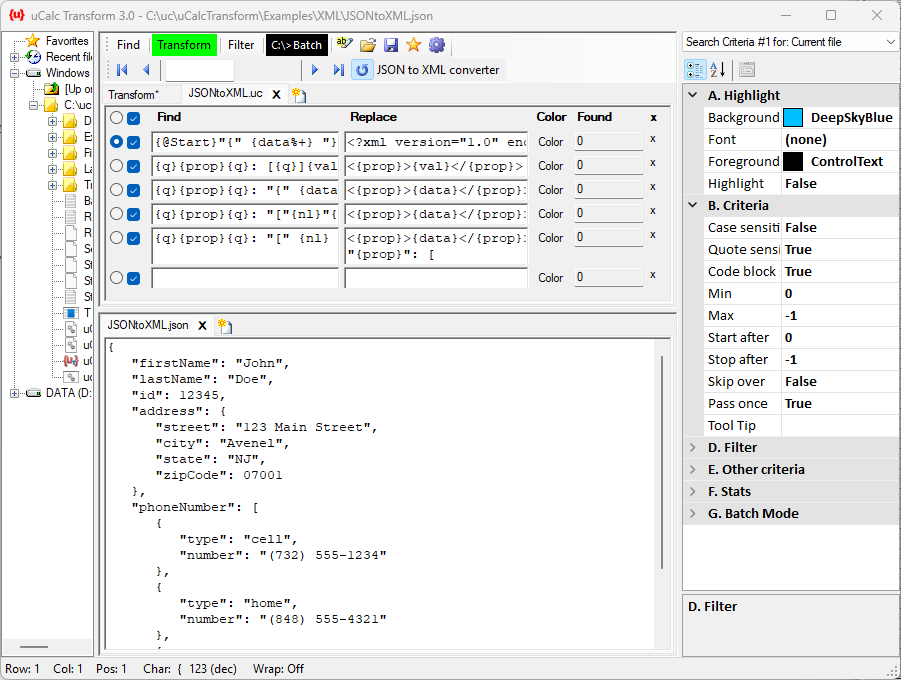
Transformer Desktop App
A standalone tool for heavy-duty text and code transformation using intuitive patterns.
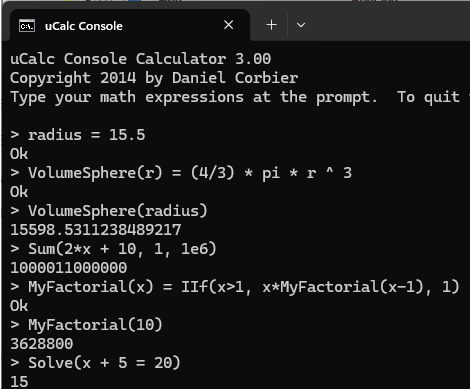
Console Calculator
A lightweight command-line calculator. Perfect for power users.
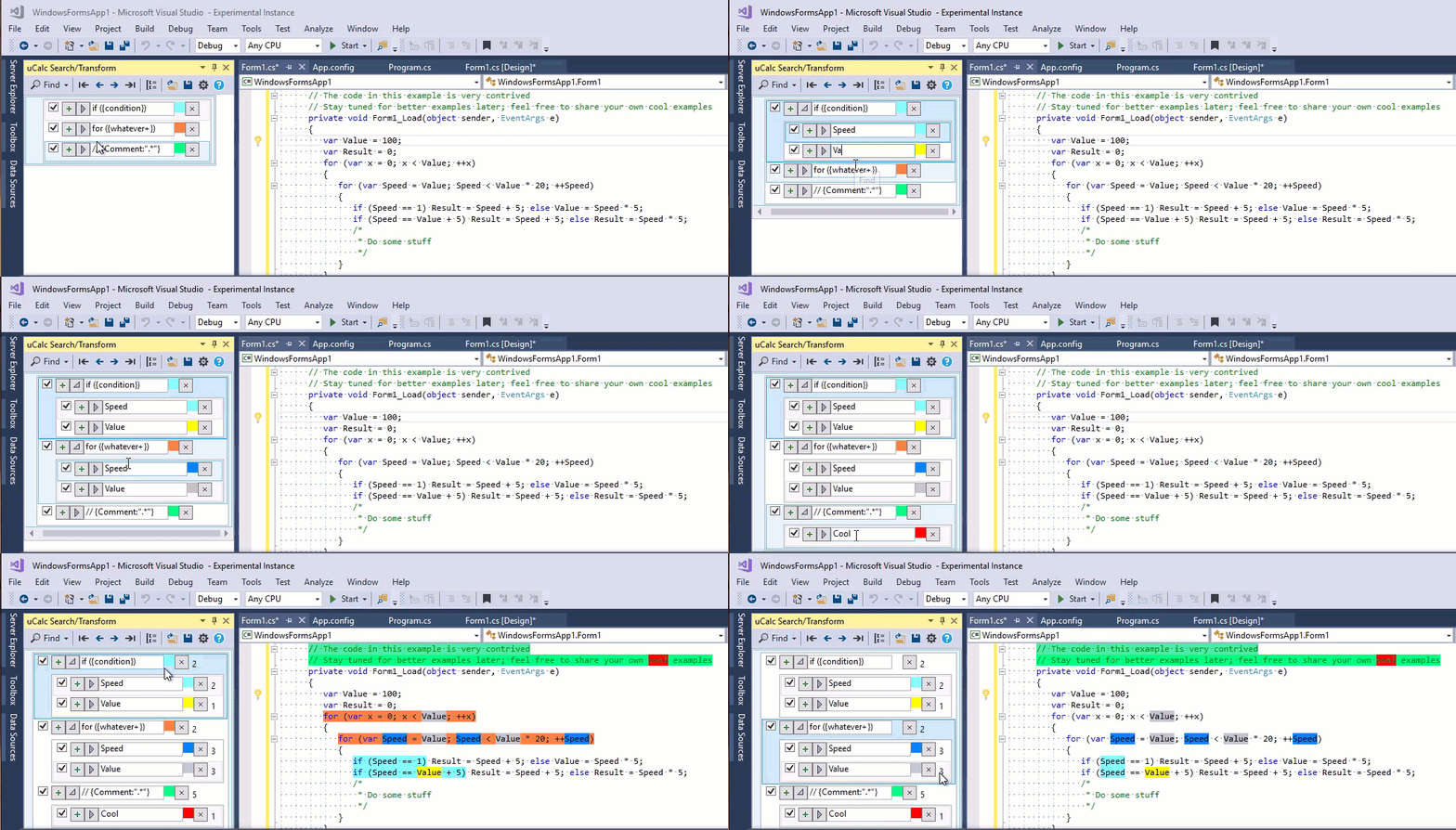
Visual Studio Extension
Integrate the token-aware search and transformer tool directly into your IDE.